
Best IPTV Players and Apps — Firestick, Android, PC and Mac
Your subscription is three details. The player app is what turns them into television — and the app you choose affects picture stability more than almost anything else. This guide covers which player suits which device, and the one setting that fixes most buffering complaints.
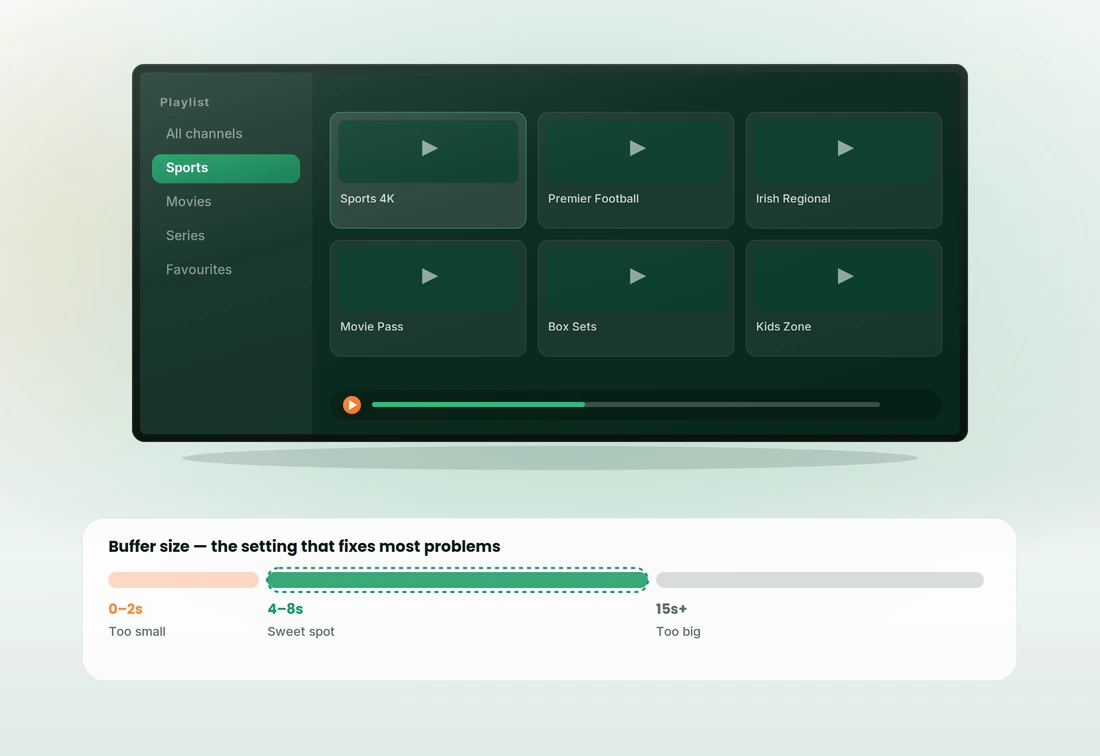
Player comparison table
Every player here accepts the same login. They differ in how they handle the programme guide, whether you can control the buffer, and how much fiddling the setup takes.
What actually separates a good player from a bad one
Three things matter and the rest is interface preference. Get these right and most "the service is buffering" problems disappear.
Buffer size — the setting nobody explains
Almost every player lets you set how many seconds it downloads ahead. People assume bigger is safer. On live sport, bigger just means you hear the neighbours celebrate before you see the goal.
EPG handling and codec support
The other two things worth checking before you commit to a player.
Best IPTV players for Firestick and Android TV
This is where the best players live, and where most Irish customers end up. All three install from the same place and accept the same login.
TiVimate IPTV Player
The best programme guide of any player in this list, and the reason heavy users move to Android hardware. Groups, favourites and multi-view are handled properly, and the buffer is fully adjustable.
The free tier covers ordinary viewing. Premium adds recording, multiple playlists and a few conveniences — worth it if you watch a lot of sport, unnecessary if you do not.
IPTV Smarters Pro
The most widely used player in this market and the one our support team knows inside out. It runs on Firestick, Android, iOS, Windows and Mac, so one set of instructions covers a whole household.
Setup is genuinely the fastest here — choose the Xtream Codes login option, enter three details, and the channel list builds itself. The interface is busier than TiVimate but nothing is hidden.
Smarters Player Lite
A lighter build for older sticks and slower boxes. It drops some of the features and, with them, most of the ways a setup can go wrong — which makes it a sensible pick for a second room.
If someone in the house finds the full app confusing, this is usually the fix rather than buying new hardware.
Best smart IPTV player for Samsung and LG
Both platforms carry compatible players in their own app stores, so there is no sideloading, no developer mode and nothing to enable. The trade-off is fewer settings when something needs tuning.
- No sideloading on either platform — everything comes from the TV's own store.
- Limited buffer control — if the picture wobbles, you have fewer levers than on Android.
- A €45 stick is the usual fix if a Smart TV player keeps struggling — cheaper than a new TV, better than a fight.
Best IPTV player for PC, Mac and Enigma2
Three routes for people who are not watching on a stick — one for testing, one for tinkering, one for existing satellite hardware.
VLC and desktop M3U players
VLC will open your playlist in about thirty seconds, which makes it the fastest way to confirm a trial line is live. Open the network stream dialogue, paste the M3U URL, and it plays.
What it will not give you is a programme guide, channel categories or favourites. Treat it as a diagnostic tool — if VLC plays and your TV app does not, the problem is the app or the device, not the service.
Kodi IPTV player setup
Kodi handles IPTV through a PVR client add-on rather than natively. Enable the simple PVR client in add-ons, point it at your M3U URL and your EPG URL, then restart Kodi so the channel list builds.
Once configured it is powerful and highly customisable. Getting there involves more steps than any other option here, so we would not suggest it as a first setup unless you already use Kodi.
Enigma2 player configuration
Enigma2 receivers load channels as bouquets rather than through an app. You upload a playlist file or point the box at a URL, and the channels sit alongside anything already tuned in.
It suits people who already own the hardware and are comfortable with its interface. Tell us it is an Enigma2 box when you order and we will send the right format and talk you through the upload.
Not sure? Ask before installing
Player apps change constantly — one gets abandoned, another gets an update that breaks EPG loading. What we recommend this month is not always what we recommended last year.
Tell us your device and we will name the player that is behaving well right now, with instructions written for that exact combination. It costs you nothing and saves an evening of trial and error.
Player and app questions
What customers ask about apps, settings and updates. Anything else, message support and someone will answer in minutes.
On a Firestick or Android device, TiVimate if you want the best guide, IPTV Smarters Pro if you want the quickest setup. On a Samsung or LG TV, whichever compatible player its own store carries. On a PC or Mac, VLC to test and Smarters to actually watch.
No. We supply the subscription — your username, password and server URL. The players are third-party software published by their own developers under their own terms. We recommend them and help you configure them, but we do not build or distribute them, and keeping yours updated is your responsibility.
Four to eight seconds. Below that, small network hiccups become visible stutters. Above about fifteen seconds you are noticeably behind the live action and channel changes get slow. If you need thirty seconds to stop buffering, the buffer is masking a Wi-Fi problem rather than fixing it.
Nine times out of ten, the player app. Streams move to newer codecs over time and an outdated build handles them badly, which shows up as stuttering on channels that used to be fine. Update the app first — it is the single highest-yield fix and it costs nothing.
Yes. Install it in as many players and on as many devices as you like. The limit applies to simultaneous streams, not installations — so a single-device plan means one screen playing at a time, whichever app it happens to be using.
Two ways of handing the same subscription to a player. Xtream Codes takes a username, password and server URL and pulls the channel list and guide automatically — use it wherever the option exists. M3U is a single long playlist URL, used by players that do not support the first method. We send both.
Not usually. Most of the Android players are free, with optional premium tiers for extras like recording. Samsung and LG players typically charge a small one-off fee after a trial period — a few euro once, not a subscription. Nothing you pay for a player goes to us.
Install it and get watching
Pick the player, follow the setup steps for your device, and know the fixes before you need them.
Get the login, pick a player, start watching
Tell us your device when you request a trial and we will send instructions written for that exact combination — the right player, the right settings, nothing to work out yourself.